
Hyperlink Block
Display a clickable hyperlink on a profile.
The block is available in many, but not all, modules. If it is not available in a module you need it in, file a Help > Support Request from your site with a link to the profile you are trying to add the block to.
Can use either a text field storing a URL or a hardcoded URL. Supports custom fields and Formula Fields.
Configuration Options
- Field Label - What is in the Left column as the label for the block
- Link Label - What text should replace the URL itself
- Open in a New Tab - Boolean to determine how the link opens
- Use Link Field - Boolean to determine whether to use the hardcoded link (meaning everyone gets the same URL regardless of case) or a link stored in a given Field
- Link URL Field - The field providing the URL.
Example Hardcoded to Google:

and

Example Link to External Site
Custom field named "External Case URL" that stores a hyperlink like "https://example.com/1234" or other relevant link for the case itself.


If the Link field is null, the Link presented will be a link to the current profile page.
Advanced Examples
Mailto
If you wanted a mailto link that automatically put the case email address in the CC line instead of in the TO Line, you could do that using a Custom Formula Field. Note that your formula field should just be the link text, don't try to add any <a> html codes.
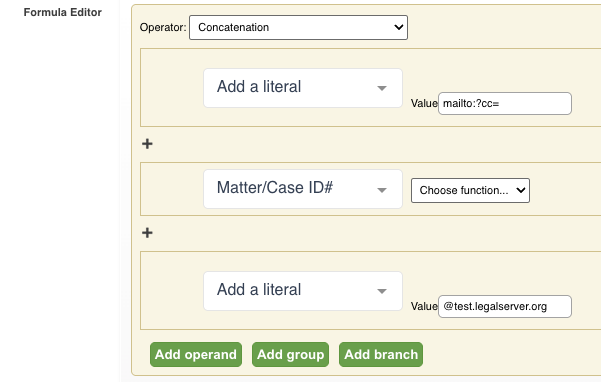
Note that this example will not get reset to your Demo site when you copy Live to Demo.
Process Links
If you want process links that will automatically update to the current site (Live or Demo), you'll again need to use Formula Fields. For example, if you want a form on a matter process to have a "Create Outreach" hyperlink, you can create a matter formula field that is the Outreach Create Link:
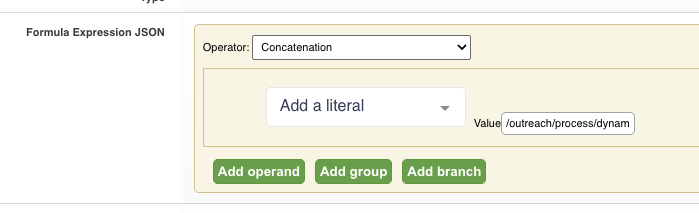
If you want a hyperlink to a specific process on the current module, you'd have something slightly different where you'd add in the database_id to the concatenation to build the URL.
This uses the URL of the process after the https://site.legalserver.org portion.
Then in the hyperlink block, reference that field:
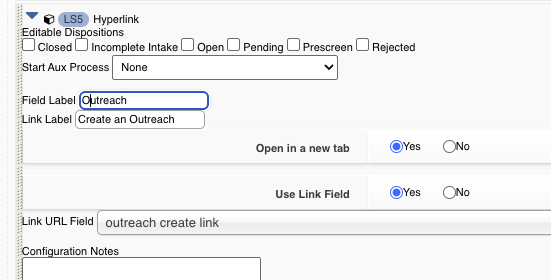
And the front end will automatically fill in the rest of the URL:
