
Send Message Block
This block sends a LegalServer message to one or more users and records a note each time the form the block is on is submitted (or loaded if configured to do so).
Compare the Send Email Block that can send an email to users, but also others like a client.
The block does not display any visible elements on a form. The message is sent and and note created silently in the background.
The block can be used on branch logic forms. It will send the message if the response(s) on the primary form cause the branch logic form to be displayed when the primary form is submitted.
The placeholders shown below ([name], [id], etc.) do not appear and do not work when the block is on a survey module form.
Configuration Options
There are several options for configuring the recipients, as well as the subject and body of the note.
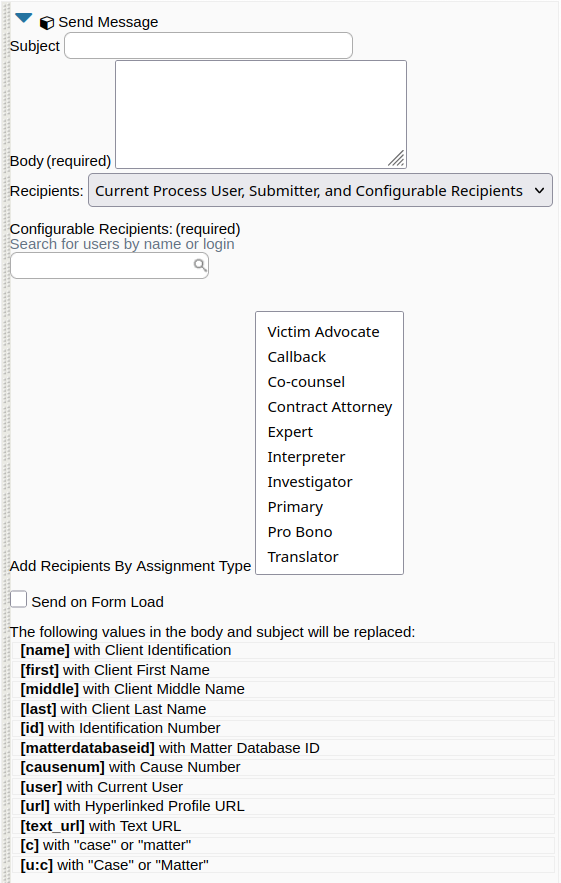
Subject is optional. If blank, the Title of the message will be "Message from Block".
Body is required.
Add Recipients by Assignment Type: A multi-select list of assignment types. For each type selected, everyone assigned to the case with that type will be emailed. This option only works on case/matter auxiliary forms.
Send on Form Load: Use with caution. "Form load" means viewing the form. As soon as you view the form, without clicking anything, the email will be sent.
Current Process User is the user filling out the form.
Submitter is designed for use on external forms, surveys, and online intakes.