
Notes - Allowing Notes to be Copied, Deleted, and Transferred
Permission: Allowing any of the Copy/Delete/Transfer actions requires the user role permission "Delete Notes".
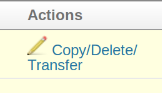
Copying
For case notes, the form allows you to copy the note to another case or cases.
There are two methods available to select the other cases. Only one method can be active on a site at a time.
Search and Select Box
This is the default method. Users see a search box and can search and select one or more cases.
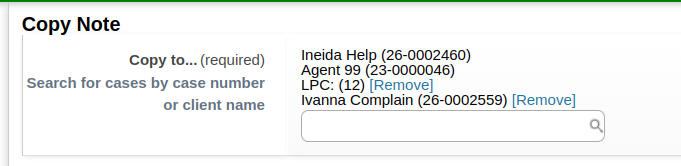
The "Copy to" field only searches open cases. To copy a note to a closed case, view the case you want to copy the note to before clicking Copy/Delete/Transfer. That will put the case in the Recent Clients list in the side bar on the delete/transfer page, and you can click on it to fill in the "Copy to" field.
List of Associated and Related Cases
Instead of copying the note by manually searching and selecting other cases, a list of associated cases and related cases can be displayed.
Administrators choose this option by setting "Use listview to select cases in note bulk actions" to Yes on the Admin > Site Settings page.
Deleting
Various notes can be deleted (from cases, outreaches, etc.). Notes created by the system, for example re-open case notes, cannot be deleted.
Clicking the link displays a confirmation form with a required Reason for Deleting text box.
The text of deleted notes appears in a log and can appear in reports. If there is sensitive information in a note, it should be edited and removed or obfuscated, and then the note deleted.
Transferring to Another Case
For case notes, the form allows you to transfer it to another case (and provide an optional reason for transferring). Transferred notes are deleted from the original case.
The "Transfer to" field only searches open cases. To transfer a note to a closed case, view the case you want to transfer the note to before clicking Delete/Transfer. That will put the case in the Recent Clients list in the side bar on the delete/transfer page, and you can click on it to fill in the "Transfer to" field.
Admin Log of Deleted and Transferred Notes
A "View Deleted Notes Log" permission controls access to the Admin > Deleted Notes link. Sites may want to allow some roles to delete notes, but only allow administrators or similar roles to see the list of all transferred and deleted notes.
Case Note Copy - Adding a Case Note to Multiple Cases
See separate article: Case Note Copy - Adding a Case Note to Multiple Cases
Things to Know
- Deleted notes are currently returned in search results using the Search > Notes feature. This may change in the future.
- Case notes created via a timeslip can be deleted and will no no longer appear in the Case Notes list on the case. However, the note still appears on the timeslip itself. This may change in the future.